> For the complete documentation index, see [llms.txt](https://sdk.chorus.one/llms.txt). Markdown versions of documentation pages are available by appending `.md` to page URLs; this page is available as [Markdown](https://sdk.chorus.one/our-products/staking-dapp/how-to-stake.md).
# How to Stake
How a staker connects a wallet, chooses an amount, and stakes.
Staking through the dApp takes three steps: the staker connects a wallet, enters an amount, and approves the transaction in their wallet. The flow is the same for ETH, SOL, and GRAM; only the wallet and network differ.
The dApp is at [staking.chorus.one](https://staking.chorus.one/eth/stake).
## Step 1: Connect a wallet
On the stake page, the staker selects **Connect Wallet** and chooses a wallet:
* For **ETH**, an Ethereum wallet (MetaMask, Phantom, WalletConnect, or a hardware wallet).
* For **SOL**, a Solana wallet.
* For **GRAM**, a TON-compatible wallet.
When the dApp runs inside a supported host with an approved WalletProfile (for example an embedded wallet or custody platform), it connects to the staker's active account automatically, skipping this step. See the [Integration guide](/our-products/staking-dapp/integration-guide.md) for details.
## Step 2: Enter the amount to stake
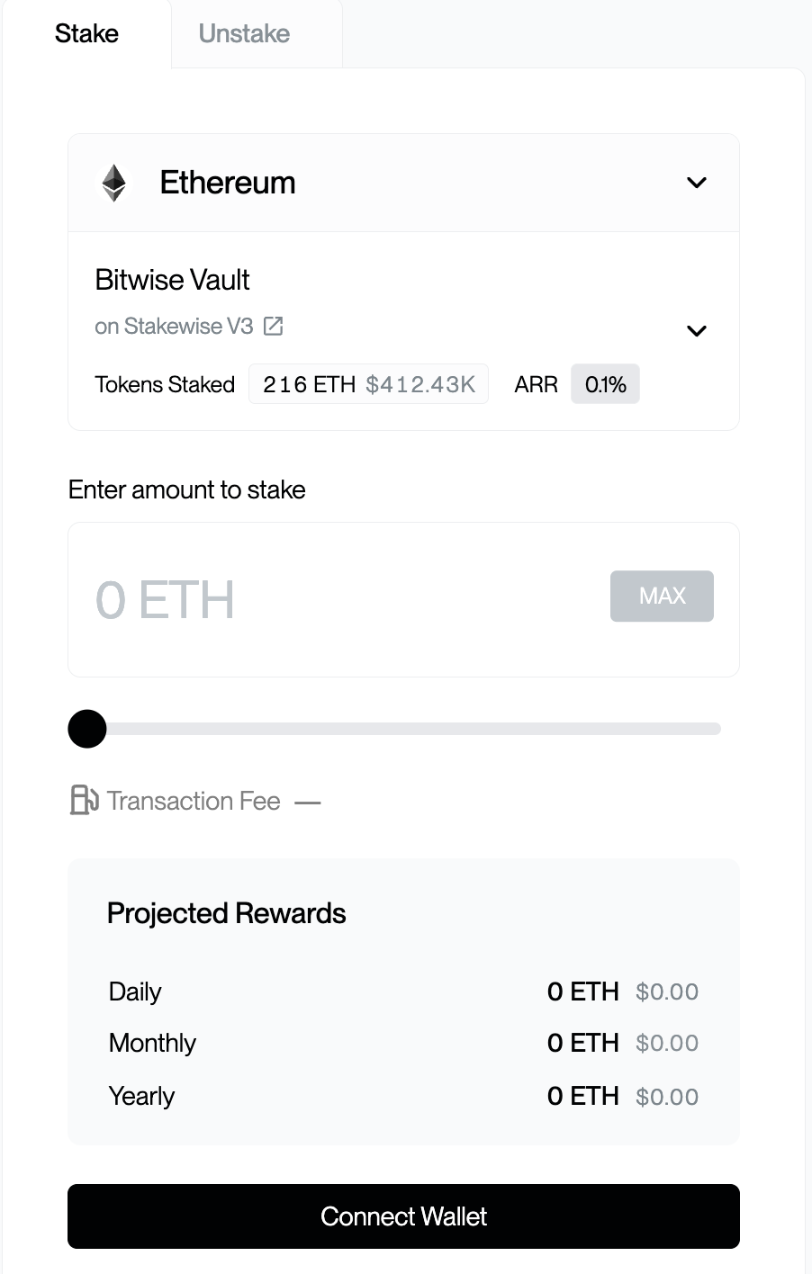
The staker selects the asset, enters the amount to stake, and reviews the details shown: estimated rewards and any network fees.
ETH has no minimum; SOL and GRAM have small minimum stake amounts, which the dApp displays before the staker confirms.
The stake screen (test environment; all figures shown are test data)
## Step 3: Approve the transaction
The staker selects **Stake** (or **Confirm and Stake**). Their wallet prompts them to review and sign the transaction; confirming it broadcasts the stake to the network.
Once the transaction is confirmed on-chain, the position is active and begins accruing rewards. The staker can review their staked balance and rewards in the dApp dashboard at any time.
For institutional stakers and platform partners, detailed multi-network reward reporting, historical data, and exports are available via the [Rewards Dashboard](/our-products/chorus-one-rewards.md).
{% hint style="success" %}
That completes a stake. For exiting a position later, see [Unstaking & Withdrawing](/our-products/staking-dapp/unstaking-and-withdrawing.md).
{% endhint %}
## Staking targets & audits
Each asset stakes to a published, verifiable target:
* **ETH: StakeWise V3 vault contracts.** Source and audit reports are published in the StakeWise V3 core repository: [github.com/stakewise/v3-core/audits](https://github.com/stakewise/v3-core/tree/main/audits).
* **SOL: native validator.** SOL is staked natively to our Solana validator, viewable on [Solana Beach](https://solanabeach.io/validator/Chorus6Kis8tFHA7AowrPMcRJk3LbApHTYpgSNXzY5KE).
* **GRAM: TON Pool.** Contract source and the 2025 Cantina audit report are published at [github.com/ChorusOne/tonpool](https://github.com/ChorusOne/tonpool).
{% hint style="info" %}
The live contract and validator addresses can also be verified against the **FAQ** section inside the dApp at [staking.chorus.one](https://staking.chorus.one/eth/stake) before interacting with them directly.
{% endhint %}
---
# Agent Instructions
This documentation is published with GitBook. GitBook is the documentation platform designed so that both humans and AI agents can read, navigate, and reason over technical content effectively. Learn more at gitbook.com.
## Querying This Documentation
If you need additional information that is not directly available in this page, you can query the documentation dynamically by asking a question.
Perform an HTTP GET request on the current page URL with the `ask` query parameter, and the optional `goal` query parameter:
```
GET https://sdk.chorus.one/our-products/staking-dapp/how-to-stake.md?ask=&goal=
```
`ask` is the immediate question: it should be specific, self-contained, and written in natural language.
`goal` is optional and describes the broader end goal you are ultimately trying to accomplish on behalf of the user. GitBook uses it to tailor the answer towards what is most useful for that goal.
The response will contain a direct answer to the question and relevant excerpts and sources from the documentation.
Use this mechanism when the answer is not explicitly present in the current page, you need clarification or additional context, or you want to retrieve related documentation sections.