> For the complete documentation index, see [llms.txt](https://sdk.chorus.one/llms.txt). Markdown versions of documentation pages are available by appending `.md` to page URLs; this page is available as [Markdown](https://sdk.chorus.one/our-products/staking-dapp.md).
# Staking dApp
A ready-to-integrate, non-custodial staking dApp for institutions staking to their clients.
The staking dApp is a ready-to-integrate, non-custodial staking interface that institutions embed into their own products. Wallets, custodians, exchanges, and asset managers use it to give their clients access to staking across leading networks, without operating validators or building staking flows in-house.
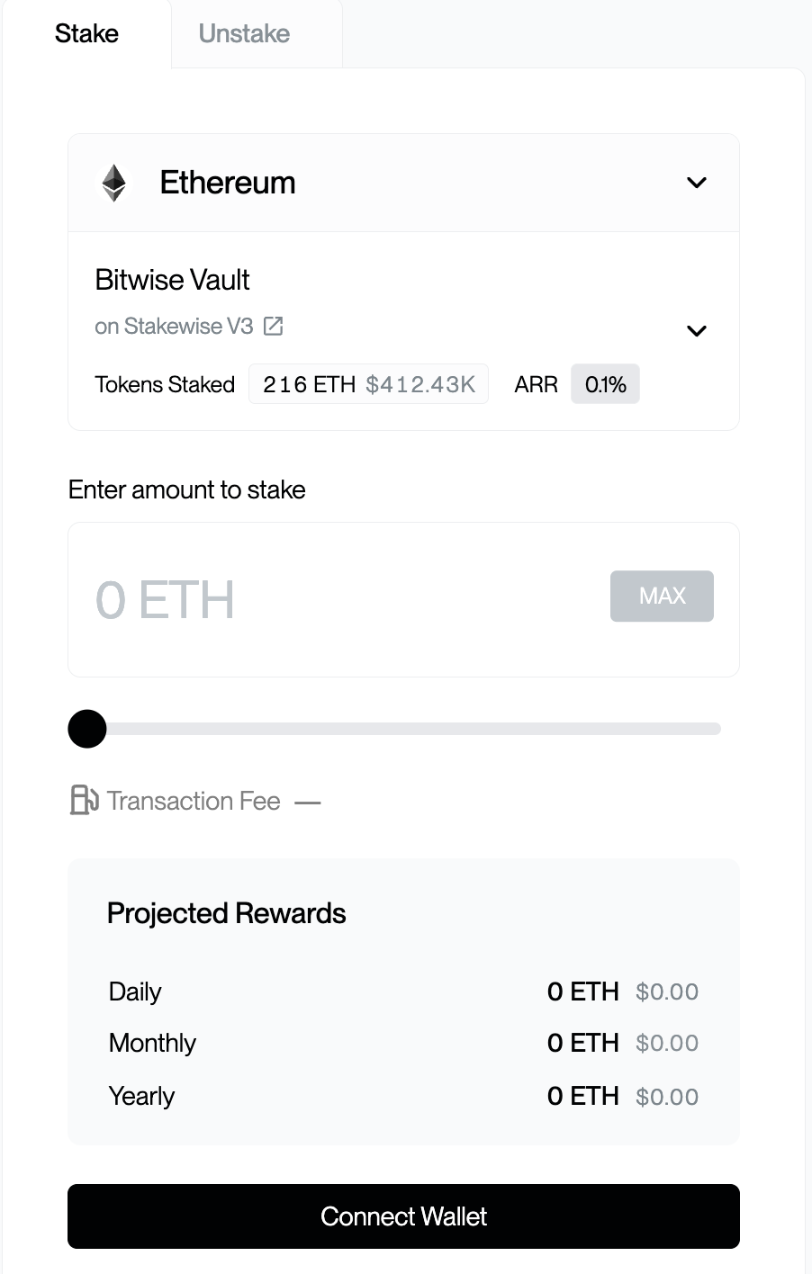
For the end user the experience is simple: connect a wallet, choose an asset, and start earning rewards in a few clicks, with no custody hand-off. For the platform, integration is light: embed the dApp directly inside your app, or connect it over WalletConnect, with Bitwise engineering support from integration to launch.
It is also available as a standalone web app at [staking.chorus.one](https://staking.chorus.one/eth/stake).
The staking dApp (test environment; all figures shown are test data)
## Supported assets
The dApp currently supports staking for:
| Asset | Network | Delegation Location |
| -------------- | ---------------------- | ------------------------------------------------------------------------------------------------------------------ |
| **ETH** | Ethereum | StakeWise V3 vault ([v3-core audits](https://github.com/stakewise/v3-core/tree/main/audits)) |
| **SOL** | Solana | Native staking ([Solana validator](https://solanabeach.io/validator/Chorus6Kis8tFHA7AowrPMcRJk3LbApHTYpgSNXzY5KE)) |
| **GRAM (TON)** | The Open Network (TON) | TON Pool ([ChorusOne/tonpool](https://github.com/ChorusOne/tonpool)) |
{% hint style="info" %}
The ETH and GRAM staking contracts are open source and independently audited; SOL uses native validator staking.
{% endhint %}
## Rewards, fees & timing
| Asset | Reward rate (ARR) | Reward frequency | Delegation time | Fee |
| -------- | ----------------- | ------------------------------- | --------------- | ------------------------- |
| **ETH** | 2.62% | Per epoch (\~6 min) | Near-immediate | 5% commission on rewards |
| **SOL** | 7.19% | Per epoch (\~2–3 days) | Up to 3 days | 8% commission on rewards |
| **GRAM** | 17.41% | Per validation round (\~18 hrs) | Up to 18 hrs | 20% commission on rewards |
On ETH, delegation is near-immediate: staking mints a share of the staking vault that begins accruing rewards right away, with no activation queue to wait through.
{% hint style="info" %}
Reward rates (ARR) are indicative and vary with network conditions. Figures shown are as of August 2026; live rates are always displayed in the dApp. Delegation time is how long after staking your position becomes active. Current network metrics are published at [onchain.bitwiseinvestments.com/staking](https://onchain.bitwiseinvestments.com/staking).
{% endhint %}
## Why integrate the staking dApp
### For your platform
* **Launch staking without building it.** Offer staking to your clients without operating validators or writing staking logic. The dApp handles transaction construction, signing, and broadcast, backed by institutional-grade infrastructure.
* **Two low-lift integration paths.** Embed the dApp directly inside your app, or connect it over WalletConnect, whichever suits your platform, with engineering support through integration and launch. See the [Integration guide](/our-products/staking-dapp/integration-guide.md).
* **Non-custodial by design.** Client transactions are signed in their own wallets and clear-signed for review, so signers see a human-readable view of exactly what they approve. The dApp never takes custody of client keys or assets.
* **Institutional-grade and secure.** Built on a validator stack securing billions in assets, with a non-custodial setup, ISO 27001 certification, and SOC 2 compliance.
* **One integration, multiple assets.** A single, consistent interface covers leading networks.
* **Reporting.** Detailed multi-network reporting for rewards, commissions, ARR, and CSV/Excel exports via the [Rewards Dashboard](/our-products/chorus-one-rewards.md).
### For your users
* **Stake in a few clicks.** Connect a wallet, choose an asset and amount, and approve in-wallet. No minimum on ETH; small minimums on SOL and GRAM.
* **Immediate rewards on ETH.** Depositing mints a share of the staking vault that starts earning right away, with no activation queue to wait through.
* **Bring your own wallet.** Use the wallet you already have, or stake straight from the platform's in-app wallet with automatic connection.
* **Transparent rewards.** Track staked balances and accrued rewards in real time in the dApp.
## How connecting works
There are two ways to use the dApp:
1. **Connect a wallet.** From the public web app, connect an injected wallet (MetaMask, Phantom, and others), WalletConnect, or a hardware wallet, then stake.
2. **Auto-connected wallet.** When the dApp is opened inside a supported host with an approved WalletProfile (for example an embedded wallet or custody platform), it connects to the active account automatically, with no wallet picker required. This is covered in the [Integration guide](/our-products/staking-dapp/integration-guide.md).
## Get started
* [**How to Stake**](/our-products/staking-dapp/how-to-stake.md): connect a wallet, choose an amount, and confirm the transaction.
* [**Unstaking & Withdrawing**](/our-products/staking-dapp/unstaking-and-withdrawing.md): unstake your position and withdraw your assets back to your wallet.
* [**Integration guide**](/our-products/staking-dapp/integration-guide.md): for partners who host the dApp inside their own wallet or custody platform.
{% hint style="info" %}
For institutional staking inquiries, contact the staking team at `StakingBOS@bitwiseinvestments.com`.
{% endhint %}
---
# Agent Instructions
This documentation is published with GitBook. GitBook is the documentation platform designed so that both humans and AI agents can read, navigate, and reason over technical content effectively. Learn more at gitbook.com.
## Querying This Documentation
If you need additional information that is not directly available in this page, you can query the documentation by asking a question.
Perform an HTTP GET request on the following URL with the `ask` and `goal` query parameters:
```
GET https://sdk.chorus.one/our-products/staking-dapp.md?ask=&goal=
```
`ask` is the immediate question: it should be specific, self-contained, and written in natural language.
`goal` is what the user is ultimately trying to achieve, the reason they need the answer. Sharing it helps GitBook give you a better, more relevant answer. A goal is most helpful when it describes the outcome the user wants rather than restating the question. For example, with `ask=how do I create an API token`, a goal like `automate deployments from our CI pipeline` lets GitBook tailor the answer to that use case.
The response will contain a direct answer to the question and relevant excerpts and sources from the documentation.
Use this mechanism when the answer is not explicitly present in the current page, you need clarification or additional context, or you want to retrieve related documentation sections.